

If you study Japanese, you already know the word jisho (辞書) literally means dictionary. The site jisho.org is that idea taken seriously: not a magic box that spits out a finished translation, but the tab you open when a kanji, a name, or a line of lyrics will not sit still.
With Jisho you can read meanings, on and kun readings, stroke counts, and example sentences. You can also draw a character or pick radicals when you have no idea how to type it. The site is in English, and that is the useful part: you see extra senses instead of one guessed gloss.
Contents 6
Using Jisho to look up a real Japanese sentence
Open the site and type what you have. It can be kanji, kana, romaji, or English; Jisho tries to match it and shows a list. To show how that actually works when you are translating, take a simple sentence that also happens to be a famous title:
- 俺の妹がこんなに可愛いわけがない
If you do not know the first kanji, select 俺 and paste it. Jisho gives the word and, next to it, the character details. Click the kanji itself and you land on the full page: readings, strokes, compounds.
With a little English you already see that this one means I / me. The entry also flags that 俺 (ore) sounds rough or arrogant, the kind of “I” a guy uses with friends, not in a job interview. Next comes the particle の; park it for a second.
Then look up 妹: younger sister. The reading sits on top in hiragana. Be careful later if you dump a huge block into a machine translator: it can glue the wrong furigana to the wrong kanji and you walk away with a word that does not exist.
Doing this with the content words, and parking the particles for later, you get:
- 俺 — I, my (rough, masculine)
- 妹 — younger sister
- こんな — such, like this
- 可愛い — cute, adorable
- わけがない — there is no way that… (it is impossible)
Those are the senses Jisho actually lists. Check the furigana on the kanji so you know how to say the word, or write it in romaji. When I break down a sentence for an article or a song, I also put the line in romanization:
- 俺の妹がこんなに可愛いわけがない
- Ore no imouto ga konna ni kawaii wake ga nai
The particle の marks possession, so we are in “my little sister” territory. Search こんな without に and you get “like this.” Then cute. Then わけがない, the “no way / it cannot be” ending.
Everything before が is the subject: my sister. Japanese often lands the punch at the end, so it helps to read from the back: there is no way / this cute / like this. Put the sister back in and you get something like:
- There is no way my little sister can be this cute.
If you have seen the series, English viewers know that line as My Little Sister Can't Be This Cute. The dictionary did not invent the joke; it only gave you the pieces.
How Jisho actually helps you learn Japanese
You still have to interpret the context. Jisho is a dictionary: it offers several English senses for the same word, and you pick the one that fits the sentence. Dumping the whole line into a machine translator is how you get a confident, wrong English sentence. Looking the words up one by one is slower and a lot more honest.
Japanese is packed with idioms, so a literal stack of glosses is never the finished translation. That is the point of the exercise. Translating a song line by line, or a short scene, sticks better than filling gaps in a workbook or grinding a giant text you only half read.
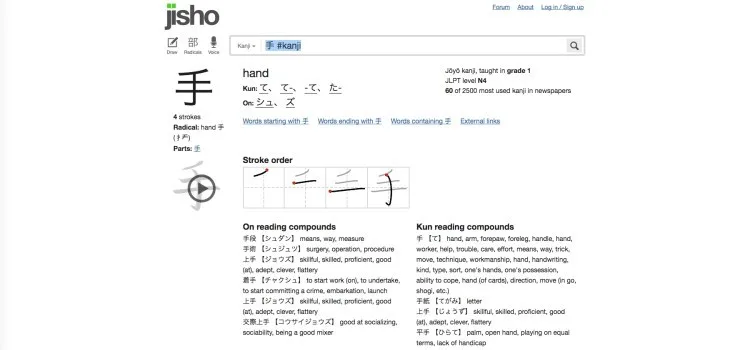
While you look words up, you also see other compounds that share the same kanji, and extra senses you would have skipped. With Jisho and real Japanese content, you can go further than a lot of textbooks. That does not mean you throw memorization away. Jisho is fast when you need a reading, and slow in the useful way: you sit with the word.
If you want to push that habit further, there is a separate piece on learning Japanese by translating and making your own content. Watching with captions is another loop that pairs well with a dictionary tab: Animelon for Japanese with anime.
When you cannot type the kanji
The search box is useless if you cannot type the character. Jisho has two ways out, and they are the reason a lot of people keep the tab open on a phone.
Draw it
Open the Draw tool on jisho.org and sketch the kanji with a mouse, a stylus, or a finger. You do not need a calligraphy prize; start drawing and pick the closest match. That drop lands you on the same kanji page: meaning, 音読み and 訓読み, stroke count, stroke order, parts, and compounds.
Build it from radicals
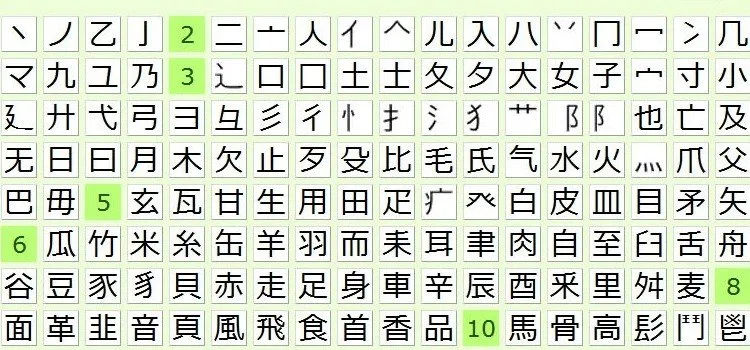
If drawing is messy, use Radicals. Open the radical panel, then tap the pieces you recognize. Each extra part cuts the candidate list down until the character shows up. This is how you look up a kanji from a paper book, a sign, or a pause screen when copy-paste is not an option.
Once you have the character, the kanji page is the real study object: stroke order, frequency, school grade, JLPT level when it is tagged. The RTK method for learning kanji pairs well with that page if you are building a memory story around the parts.
Other things Jisho is good for
Jisho is a full Japanese-English dictionary, not only a sentence decoder. A few searches worth knowing:
- Paste a whole sentence and click the underlined pieces one by one
- Look up an inflected verb such as 走った and still land on 走る
- Mix English and Japanese in one search, for example 日 sunlight
- Filter with tags: #jlpt-n5, #common, #verb, #name
- See name readings (nanori) for a kanji
- Check the JLPT level on a word or a character
- Open example sentences for a specific word
Tags are the quiet superpower. #jlpt-n3 #adjective is a study list. #common pushes rare junk down. Names live under the Names tab or #name, so you do not confuse a surname with a vocabulary word. The full list is on Jisho’s search options page.
Jisho itself is a website, not an official phone app. If you need it on the train, the mobile browser is the real client. Third-party apps reuse some of the same public dictionary data, but they are not Jisho.
Keep the tab around for the ugly moments: the kanji you cannot type, the lyric that will not parse, the name on a credit roll. If you are studying without a classroom, that habit sits next to learning Japanese on your own.




Community
Comments
0 comments
There are no published comments in this language yet.
Send comment