
Anyone learning Japanese ends up spending a lot of time on their phone. There is a huge selection of apps for Android and iOS that help with vocabulary, kanji practice, listening, and quick lookups in a dictionary. In this guide I want to walk you through the apps that have earned a permanent place on my phone, from flashcard tools to Japanese dictionaries, so you can build a study routine that actually sticks.
Most of these apps are free to use, and a few offer paid upgrades. Which ones you open every day depends on your learning style, so think of this list as a starting point rather than a fixed ranking.
Contents 26
Learn Japanese in the browser first
Before we get into the apps, a quick note: if you prefer a bigger screen, Suki Desu also runs a Japanese course that works entirely in the browser. The lessons combine classic grammar with cultural topics such as anime, manga, and everyday situations in Japan.
You can study on a computer, tablet, or phone without installing anything extra. If you want, you can also use the browser lessons alongside the mobile apps below.
Flashcard apps and spaced repetition
These apps are built to move vocabulary, kanji, and example sentences into your long-term memory. They use spaced repetition, which means the app decides when a card is due and shows it to you right before you are about to forget it.
Anki and similar apps
Android, iOS, Windows, Web
Anki is one of the best-known spaced repetition tools out there. You can run it on your computer or phone, or use another app that connects to the Anki API to sync your own decks across devices.
A lot of people use Anki to learn brand-new words. My advice is to treat it mainly as a review tool for content you have already studied or that matches your current level. The system calculates when each card is due, which saves you a lot of mindless cramming.
The official Anki app on iOS is paid, since it is the only version maintained by the original team. There are good alternatives, such as AnkiMobile, and other flashcard apps that follow a similar idea, some of them cheaper or even free.
Memrise
iOS, Android, Web
Memrise supports many languages, and its Japanese course uses real video clips of native speakers in everyday situations. The memorization system is solid. There is a free version and a Pro tier with extra content.
Japanese Kanji Study
Android
This app focuses entirely on kanji. It contains over 6,000 kanji, neatly organized by JLPT level, with exercises on reading, meaning, and writing. The interface is in English, but it works perfectly well for English-speaking learners.
WaniKani
Web, with iOS and Android via third-party apps
WaniKani is a web service that specializes in kanji and vocabulary. The system teaches you a fixed set of kanji per level, along with the readings, on a smart review schedule. Most people use WaniKani in the browser, but there are official and community apps for studying on the go.
Bunpro
Web, iOS, Android
Bunpro is the natural partner to WaniKani if you also want to learn grammar. The app collects Japanese grammar points, explains them in short, clear notes, and lets you build sentences to practice. You end up training not just words, but how to combine them.
Free apps for Japanese lessons
Beyond flashcards, there are apps that act as small courses in your pocket. They are a good way to get started or to add variety to a textbook-based routine.
LingoDeer
Android, iOS
LingoDeer was built specifically for Asian languages, with Japanese as a flagship course. The lessons are clearly structured, with audio, grammar explanations, and short tests. A lot of content is free, while full access requires a monthly subscription.
Duolingo
Android, iOS, Web
Duolingo is probably the most widely used language-learning app in the world. The Japanese course is solid, with short units, a friendly practice rhythm, and a gamified reward system. It is more than enough to start with hiragana, katakana, and simple sentences. If you want to go deeper, you will need extra material on top of it.
Obenkyo
Android, Windows
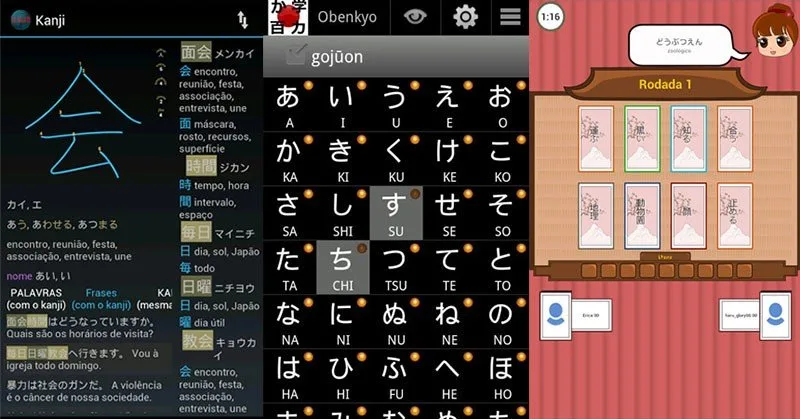
Obenkyo has long been one of the most popular Japanese apps on Android. It includes exercises, flashcards, quizzes, and even a way to draw kanji directly on the screen. There are short grammar notes as well. Note that Obenkyo is not available on iOS.
JA Sensei
Android
JA Sensei bundles hiragana, katakana, kanji, vocabulary, phrases, and grammar in a single app. You get audio quizzes, multiple-choice tests, self-assessment, and handwriting exercises where you trace kanji with your finger. It works well as a mobile companion to a textbook.
NHK Japanese Lessons
iOS and Android
The NHK World Japan Lessons app collects the popular audio lessons from Japanese public broadcaster NHK. More than 50 lessons are available, mostly in Japanese with some English explanations. If you want to train your ear for real spoken Japanese, this is a strong place to start.
Japanese podcast apps
iOS, Android
If you prefer to learn Japanese passively through listening, podcasts are a good option. There are dedicated apps for learners that offer dialogues at slow and normal speed. Streaming services such as Spotify and Apple Podcasts also host a large selection of shows aimed at Japanese learners. These formats fit nicely into cooking, commuting, or working out.
Paid apps and subscriptions
Not every good app stays free forever. If you are willing to spend a small amount each month, you usually get more content, more exercises, and no ads.
Typical examples are LingoDeer Premium, the Pro version of Memrise, WaniKani, and Bunpro. Prices usually fall between USD 5 and 15 per month, and many services offer cheaper annual plans. If you are serious about learning Japanese, a subscription can speed up your progress compared to free-only tools.
Even so, it is worth testing the free versions first. That way you can see whether the app's teaching style actually suits you before you pay.
Japanese dictionaries on the go
A good dictionary is essential when you study Japanese. On your phone it is always with you, and it gives you readings, meanings, and example sentences in seconds.
Jisho.org
Web and via third-party apps
Jisho.org is the most popular free Japanese dictionary on the web. You can use it directly in the browser, or through apps such as Jisho (Android) and Imiwa? (iOS) on your phone. The search works with romaji, kanji, or kana, and returns very detailed results.
Tenjin
Android
Tenjin is a free, offline Japanese dictionary with no ads. It shows kanji, readings, example sentences, and grammar points in a clean interface. If you want a light and fast dictionary without clutter, this is a solid pick.
Tango Master
Android, Windows
Tango Master is aimed at more advanced learners. You can look up kanji by radicals, practice pronunciation, and see stroke order. The built-in shiritori game, where you build words starting with the last character of the previous one, is a nice bonus.
Game apps for a change of pace
Games keep things fun and add variety when classic flashcard drilling starts to feel stale.
Karuta Kanji
Android, iOS
Karuta Kanji works like the traditional Japanese karuta card game. You see a word in hiragana and have to grab the matching card written in kanji. The app includes the 181 kanji from JLPT N4, combined into 245 words. You end up practicing reading and writing almost without noticing.
Japanese Dungeon: Learn J-Word
Android, iOS
This game takes you through small dungeons where you collect vocabulary and fight monsters. A good fit if you like mixing vocabulary study with role-playing game elements.
Kanji Connect
Android, iOS
In Kanji Connect, you link kanji together to form compound words. The game is a useful way to practice readings and meanings of kanji combinations, with the difficulty ramping up as you go.
Other useful apps for Android and iOS
To close, here is a list of apps that do not fit neatly into the categories above but are still worth a look:
- Kanji stroke order apps Fully free apps that show you the correct stroke order of kanji, with animations and writing practice. Very useful when you are learning to write kanji neatly.
- NHK audio courses Several apps bundle the NHK lessons as audio files, ideal for studying on the go.
- Imiwa? A popular Japanese-English dictionary for iOS, with offline mode.
- Nihongo - Japanese Dictionary A solid English dictionary in the Apple Store, useful if you are also learning English.
- Simple Furigana An app that adds furigana to web pages and texts, handy for practicing with real Japanese content.
- Manabu Academy A playful learning app with lessons on hiragana, katakana, and simple sentences.
- JClass A learning app with quizzes, a medal system, and content organized by JLPT level.
- HelloTalk A messenger app that lets you chat with native Japanese speakers and other language learners, a great way to use what you have studied in real conversations.
Tips for learning Japanese with apps
Apps are convenient, but they rarely work as a stand-alone study method. A few tips from real use:
- Stick to a few apps and use them often. Three or four apps that you open every day will get you further than twenty you only install once.
- Combine flashcards with real input. Anki or WaniKani help you store knowledge, while anime, manga, YouTube, or Japanese podcasts give you the input your brain needs: listening and reading in actual situations.
- Pay attention to review intervals. Apps that use spaced repetition are far more effective in the long run than rote vocabulary lists.
- Set small, realistic goals. A plan of 10 to 20 minutes a day is usually enough to see clear progress over months.
- Use offline features. Anyone studying on a plane, in a subway, or while traveling abroad will be glad to have apps that work without internet.
What apps alone cannot replace
Apps are a practical tool, but they do not replace structured lessons or real contact with the language. If you want to speak Japanese fluently, you also need:
- Active speaking practice. Language exchanges through HelloTalk, Tandem, or similar apps, ideally combined with regular conversation sessions with native speakers.
- Input in real situations. Japanese series, news, YouTube channels, or light readers show you how the language is actually used day to day.
- A learning structure. Pairing modules from a textbook such as Genki or Minna no Nihongo with apps keeps grammar in view and stops you from becoming a pure vocabulary collector.
If you use apps regularly, combine them with some input, and speak Japanese with other people from time to time, you will be surprised how quickly progress shows up. The apps in this guide should help you get started or sharpen an existing routine.






Community
Comments
0 comments
There are no published comments in this language yet.
Send comment