
Small kana are one of the first things that make Japanese typing feel confusing. You write a word in rōmaji, but the IME gives you the full-size character instead of the small one you expected. The good news is that there is a pattern behind it, and once you know the usual inputs, typing っ, ゃゅょ, and the small vowels becomes much easier on both desktop and mobile.
This guide focuses on the small kana that appear in everyday Japanese: the small tsu used for doubled consonants, the small ya, yu, yo used in combinations such as kya and sho, and the small vowels that show up in loanwords such as ファ and ウィ. I will also point out where beginners usually get stuck, because many mistakes come from typing the right sound with the wrong pattern.
Contents 7
The small tsu っ / ッ and what it does
The small tsu is called sokuon (促音). Its main job is to mark a doubled consonant, which is why it often appears in words such as がっこう, きって, and サッカー. In rōmaji, that doubled sound is usually written by repeating the consonant that follows.
That is why the easiest way to type a small tsu inside a word is usually to type the word normally in rōmaji:
- gakkou → がっこう
- kitte → きって
- sakkaa → サッカー
- yatta → やった
- maccha → まっちゃ
If you need the small っ or ッ by itself, many IMEs also accept inputs such as ltu, xtu, ltsu, or xtsu. This is useful when you are testing the keyboard, typing examples, or writing an explanation instead of a full word.
How to type small ゃ, ゅ, and ょ
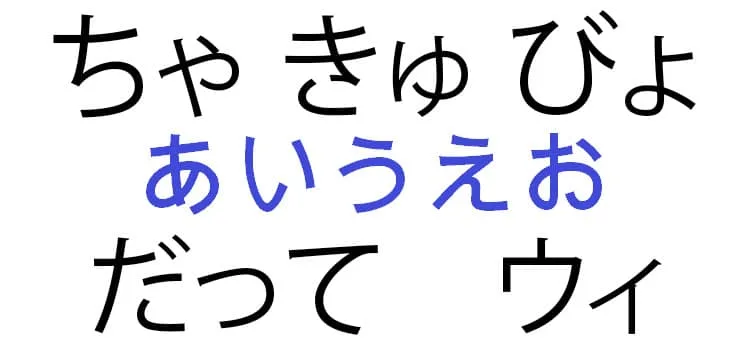
The small versions of や, ゆ, and よ are used to build contracted sounds called yōon (拗音). You see them after kana from the i row, which is why combinations such as きゃ, しゅ, and ちょ are so common.
In practice, you usually type the sound you want in rōmaji and let the IME convert it:
- kya → きゃ / キャ
- shu or syu → しゅ / シュ
- cho or tyo → ちょ / チョ
- nyu → にゅ / ニュ
- ryo → りょ / リョ
- pyu → ぴゅ / ピュ
A useful rule to remember is this: if the sound would be written in English as kya, sho, chu, rya, and so on, type that combined sound directly. You do not type kiya if you want きゃ. Writing kiya will usually give you the full-size や, which changes the word.
Some everyday examples are:
- kyou → きょう, today
- shashin → しゃしん, photo
- nyuusu → ニュース, news
- chokoreeto → チョコレート, chocolate
How to type small ぁ ぃ ぅ ぇ ぉ
Small vowels appear less often, but they matter in loanwords, sound effects, stylized writing, and older spelling patterns. A common way to type them is to add x or l before the vowel:
- xa or la → ぁ / ァ
- xi or li → ぃ / ィ
- xu or lu → ぅ / ゥ
- xe or le → ぇ / ェ
- xo or lo → ぉ / ォ
This pattern also helps with katakana combinations used for foreign sounds. For example:
- fa → ファ
- fi → フィ
- fe → フェ
- fo → フォ
- wi → ウィ
- we → ウェ
- va → ヴァ
- vi → ヴィ
- ve → ヴェ
- vo → ヴォ
If your IME feels inconsistent here, that is normal. Japanese input systems tend to accept more than one valid romanization, especially for foreign sounds. When one pattern does not convert the way you expect, try the alternative spelling accepted by your IME.
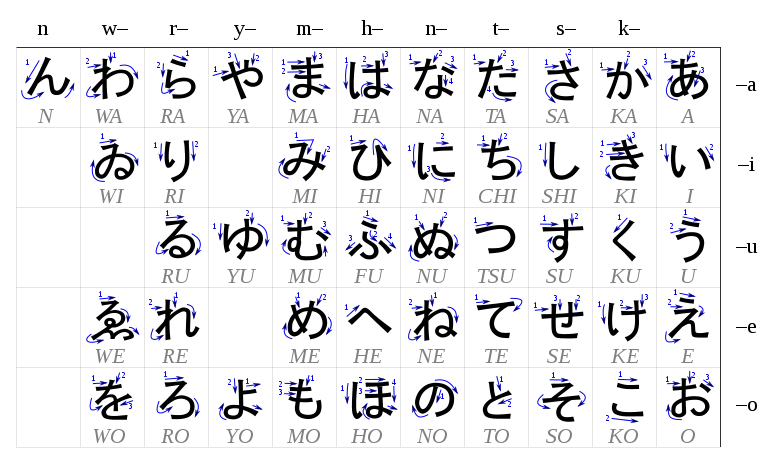
What about ゐ and ゑ?
You may still come across ゐ and ゑ in charts, dictionaries, brand names, shrine names, and historical material. They belong to older spelling conventions and are uncommon in modern Japanese, though they still survive in a few proper names and specialized contexts.
For most learners, they are not part of daily typing. Modern Japanese normally uses other spellings instead, so you can treat them as rare characters rather than something you must memorize early.
Typing on phones and tablets
On phones, the exact layout depends on the keyboard you installed, but the logic is similar. In kana layouts, small kana are often available by flicking, long-pressing, or choosing a variant from the same key. In rōmaji layouts, the keyboard usually converts the same patterns you would use on a computer, such as kya, sha, fa, or a doubled consonant for small っ.
If you switch between desktop and mobile a lot, it helps to memorize the sound pattern instead of the brand of keyboard. Once you know why きゃ comes from kya and why がっこう comes from gakkou, the device matters much less.
Common mistakes when small kana do not appear
- You typed kiya instead of kya, so the IME gave you きや instead of きゃ.
- You tried to force a small tsu where Japanese actually needs a doubled consonant in the full word.
- You used a spelling your IME does not prefer, even though another valid spelling would work.
- You are typing in the wrong input mode, such as direct Latin characters instead of Japanese IME.
When something looks wrong, the fastest test is to type a known example such as gakkou, sha, or fa. If those work, the problem is usually the specific spelling of the word you are trying to enter.
Quick reference
- Small tsu: type the doubled consonant in the word, or use ltu / xtu for the character by itself.
- Small ya, yu, yo: type combined sounds such as kya, shu, cho, nyu, or ryo.
- Small vowels: use xa, xi, xu, xe, xo or the same pattern with l.
- Katakana loanwords: combinations such as fa, wi, ve, and che depend on small vowels.
Once you get used to these patterns, Japanese typing stops feeling random. You start hearing the sound, typing the rōmaji, and letting the IME do the conversion naturally.
For more reading, continue with our guides on Dakuten and Handakuten - Marks in Japanese, Rōmaji - Romanization of the Japanese Language, Can ん (N) start a Japanese sentence?, and the definitive guide to hiragana and katakana.



Community
Comments
0 comments
There are no published comments in this language yet.
Send comment