
Although Japan is an advanced country in most respects, it has been surprisingly slow to digitize everyday payments. Cash and yen coins still rule most shops, but in the last few years one app has changed the way millions of people pay: PayPay [ペイペイ].
PayPay is a smartphone payment service run by PayPay Co., Ltd., a joint venture between SoftBank and Yahoo Japan. In stores that accept the app, you can pay with your phone instead of pulling out a single bill or coin.
Unlike mobile Suica, PayPay does not require the phone to support the Osaifu-Keitai NFC wallet. The app simply shows a QR code or barcode on your screen, which the cashier scans, and the payment goes through. That makes it much easier for anyone to use, even tourists, as long as they have a Japanese phone number.
The idea is quite similar to payment systems like Mercado Pago in Brazil, or to the QR codes you scan in many shops and onsen with LINE. I noticed this myself the first time I paid for an onsen visit with my phone.
PS: Don't confuse the Japanese PayPay app with paypay.pt, the Portuguese payment solutions website. They are two completely different companies that just happen to share a name.

Contents 3
What are the benefits of PayPay?
Beyond paying at the register, PayPay lets you send money to family and friends who also use the app, which is perfect for splitting a bill after dinner or a karaoke night with several people.
You can send even small yen amounts, the way you would with a bank transfer or a remittance, and there are no transaction fees and no limit on how often you can do it. That alone makes the app appealing for everyday use.
PayPay also lets you collect points on the T Point Card [T ポイントカード], and it regularly offers cashback campaigns and other deals, which keeps both the user base and the appeal of the app growing.
There are similar services out there, but PayPay is the most convenient because so many stores accept it. If you live in Japan or spend a lot of time there, you will run into the PayPay logo at almost every turn. What are you waiting for to download it?
How to use PayPay?
Setting up PayPay only takes a few minutes:
- Download the PayPay app from the App Store (iOS) or Google Play (Android).
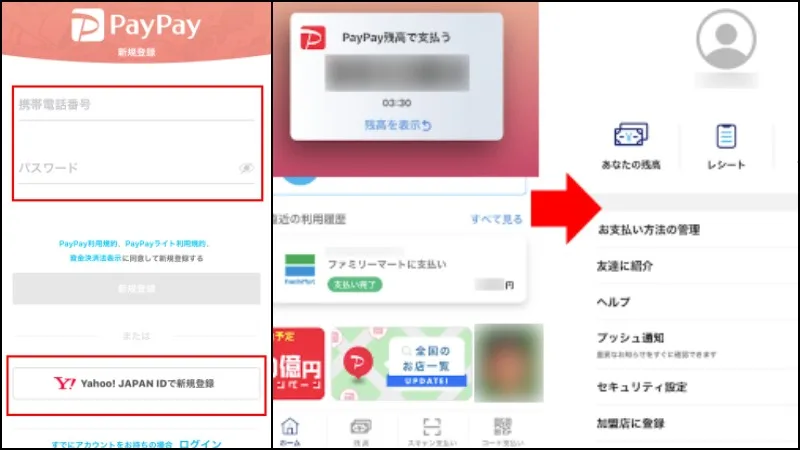
- Open the app and register with your mobile phone number and a password.
- You will receive an SMS with a confirmation code.
- Enter the code in the app to activate your account.
- Your personal barcode will appear on the home screen, and you can start paying right away.
You can also sign up with your Yahoo! JAPAN ID by tapping "New registration with Yahoo!" at the bottom of the login screen, which takes you straight to the Yahoo! JAPAN ID flow.
To top up your PayPay balance, you have a few options: link a credit card, deposit cash at a Seven Bank ATM, or connect a bank account through the Yahoo! Wallet service.
PayPay needs at least 500 yen to get started, so a small top-up is enough to begin making payments. To pay or transfer money, you simply enter the amount and scan the other party's barcode, whether that is a friend, a merchant, or a vending machine.
There are two ways to complete a transaction in a store, depending on the location. You can scan the QR code at the register, type in the amount, and ask the staff to confirm, or you can show your own barcode and let the cashier scan it.
When making a payment, you can choose between your app balance, Yahoo! money, or a linked credit card. What are you waiting for to try it out in Japan?
If you are a tourist, you will likely need a Japanese mobile number to register, and even then, basic knowledge of the Japanese language helps, because the app interface and confirmation messages are in Japanese.
Where to use PayPay?
To find a store that accepts PayPay, just tap "List of stores nationwide" on the app's home screen. The app then shows every nearby PayPay location as icons on a map of your current area.
You can use PayPay at all the major konbini like 7-Eleven, FamilyMart, Lawson, and Ministop. Stores that accept the app display the PayPay logo at the entrance or near the register. Beyond konbini, PayPay is widely accepted in:
- Supermarkets;
- Drugstores;
- Bookstores;
- Clothing stores;
- Department stores;
- General retailers;
- Leisure facilities;
- Hotels and travel agencies;
- Restaurants and izakaya;
- Delivery and local shipping services;
- Electronics stores.
Any business can choose to add PayPay as a payment option, which is why the network keeps growing. For a complete and up-to-date list, check the official PayPay website at paypay.ne.jp/shop.

Other popular alternatives in Japan are Rakuten Pay and LINE Pay. Both have wide merchant coverage, options to link a card, and their own perks. We might take a closer look at those options in a future article.
Have you used PayPay in Japan? How was the experience? If you enjoyed the article, feel free to share it with anyone heading to Japan and leave us a comment with your own tips. See you next time!







Community
Comments
0 comments
There are no published comments in this language yet.
Send comment