
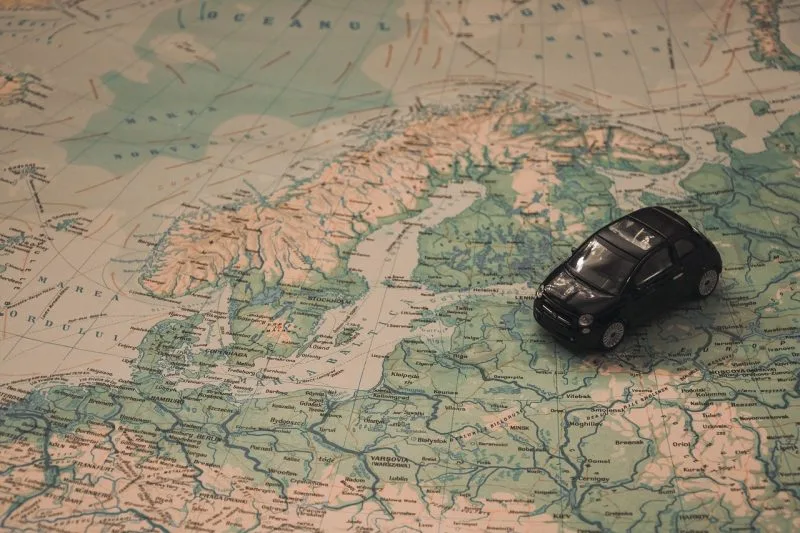
In this article, we will share an important tip that will help you find your destination in Japan, no matter where you are, using a tool that everyone has access to called Google Maps.
And even better, this trick will allow you to create a complete travel itinerary. To perform this trick, you need a mobile electronic device (smartphone or tablet) and a wifi connection.
Awesome! How do I use this trick then?” You might say this, with a big smile on your face, amazed by my skills as a technology magician.
Contents 3
How to use Google Maps to find your destination?
Using Google Maps is quite simple. First, type in a place you want to visit, then you enter where the starting point will be, and options will appear: car, public transport, and walking. When you plot the route using the public transport option, you will be able to choose the day and time you want to start your journey.
When you do this, Google Maps will tell you exactly at which stops to get off and what means of transport you need to use. Generally, it always chooses the most expensive and fastest means of transport, which is why it is recommended that you have the “JR Rail Pass” with you. This way, you can be worry-free.

The advantages of Google Maps for plotting your destination in Japan are numerous. Taking a moment to think about how Google Maps helped me during my travels in Japan, I can list:
- Time spent from one place to another;
- How many trains I need to take;
- What the train schedules are for each line and station;
- Helps avoid traffic jams and mountain paths;
- Helps find restaurants and places I want to visit;
- Alerts about closed places and operating hours;
- Displays information about tourist spots, photos, and reviews;
- Helps find hotels, onsens, convenience stores, and more;
Google Maps is a complete and essential app that everyone should have and learn to use. To make learning easier, we will do a practical demonstration of how to use the app (or trick, as I like to call it).
Using the Google Maps app
First, let's assume you are calm and serene, lying in your room, and suddenly you feel like going to a really cool neighborhood called Asakusa, which is in Tokyo. You read about this neighborhood on a website called “suki desu,” and it says that this neighborhood is very nice.
To know which way to go, you don’t need to wait until you arrive in Japan to see how to get there; just open Google Maps and type in “Tokyo Station” first.
Since the neighborhood is in Tokyo, it’s good to set the station as a starting point, but you can use the address of a hotel as a starting point if you already know where you will be staying.
Just write where I placed the arrow:
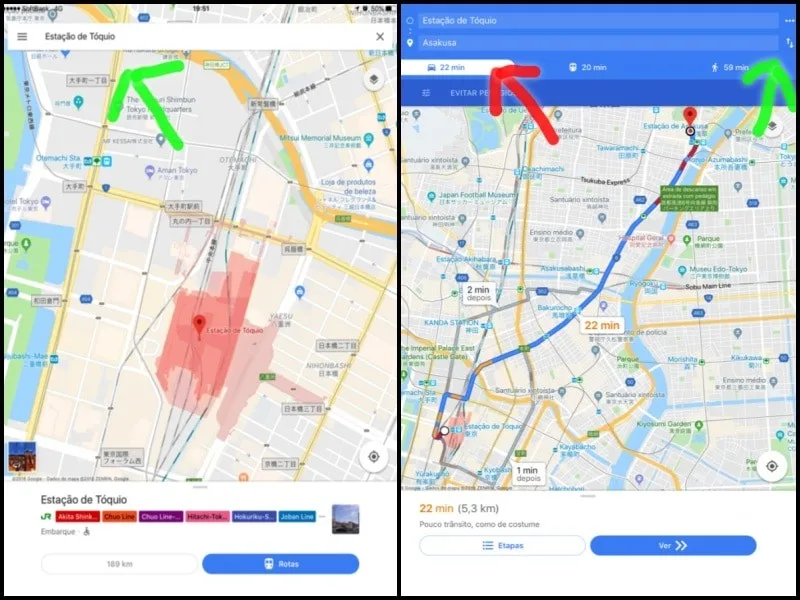
First, click on the two arrows indicated by the arrow on the right, then click where you want to go, leaving Tokyo Station for Asakusa, then just write the name where it is indicated by the arrow on the left.
Then click on the train icon, which represents public transport, and then just click on “Depart at” which is being pointed to by the arrow on the left if you want to see the schedules for the day you want to take the trip.
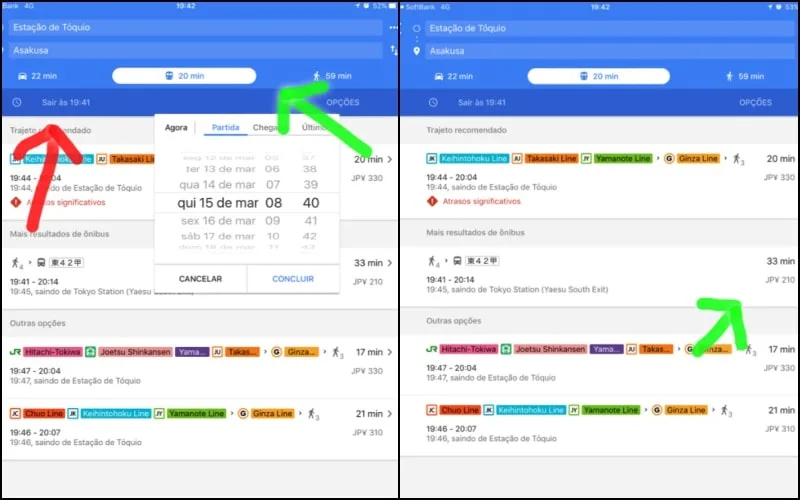
Then just choose the option that appeals to you the most; in this case, I chose the bus because it has fewer transfers. As my cousin would say, “it’s a sure thing!”
And this trick works for any city in Japan or the world that you want to visit. There are countless other options and information about Google Maps that can help you plan your trip to Japan, but unfortunately, we cannot cover everything about Google Maps, or it would become tedious to read.
The problems when looking for routes on Google Maps
Google Maps, like every human being, is imperfect and has flaws. For example, it always prioritizes the most expensive option, which involves taking the bullet train a lot! You can easily solve this by going into the settings and selecting the cheapest route option.
But when it comes to traveling to unknown places, it always helps us find our way, and that’s what we look for in an app and in a friend, someone who never lets us down!
But there is a problem: how to access Google Maps when your 4G internet plan from “Oi” only works in Brazil? How to access Google Maps if my neighbor doesn’t share the Wifi? And how then to lose 20 kilos in 10 days?
Fortunately, you can easily get free Wifi in Japan. A data SIM card is also an essential item for your trip to Japan.
You can find the answers to these questions on Suki Desu! I hope you enjoyed the article and share it with your friends. I hope you now understand that there is no better option for getting around Japan than Google Maps! If there is, leave it in the comments!
Remember that this text is part of our digital book "Getting Along in Japan," which you can download for free by signing up for our email list; you can do this in the email box that appears in the header of all articles.






Community
Comments
0 comments
There are no published comments in this language yet.
Send comment