
If you have spent any time around Japanese YouTube, doujin games or VTuber streams lately, you have almost certainly heard VoiceVox even if you did not recognize the name. The software has quietly shaped a whole subculture: synthetic characters such as ずんだもん (Zundamon) and 四国めたん (Shikoku Metan) read scripts, host videos and answer questions in voices that feel surprisingly alive. VoiceVox is an open-source text-to-speech engine for Japanese, free to use, able to run fully offline, and backed by a remarkably active community of developers, illustrators and content creators.
It is also a practical tool for learners. With VoiceVox you can hear how a sentence should sound, compare intonation across speakers, and turn long passages of Japanese into audio you can replay during a commute or while doing chores. This article walks through what VoiceVox actually is, where it came from, how the technology works under the hood, which voices and licenses ship with it, and the role it plays in the wider ecosystem of Japanese AI speech synthesis.

Contents 28
What is VoiceVox?
VoiceVox is an open-source text-to-speech (TTS) application built for the Japanese language, developed by Hiroshiba Kazuyuki. The engine source code lives on GitHub under VOICEVOX/voicevox and is released under the MIT License, which means you can download it, run it, modify it and embed it in other projects without paying licensing fees.
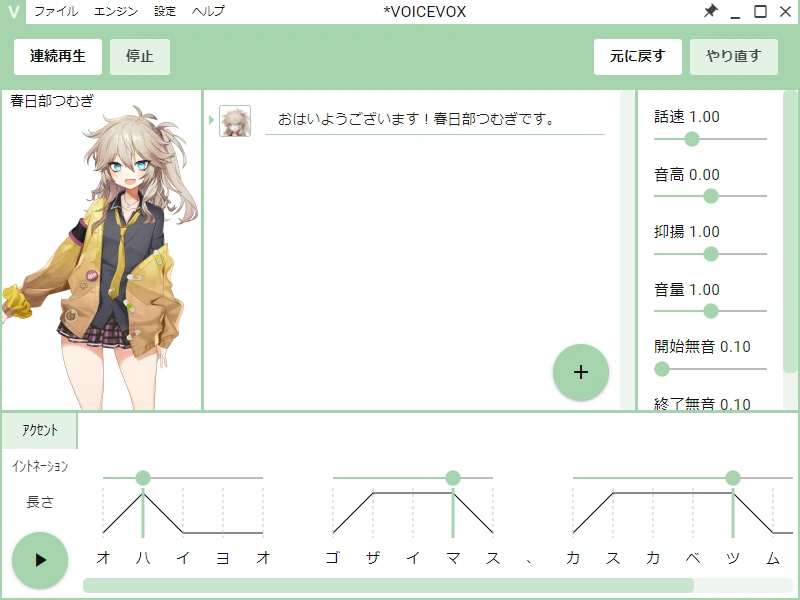
At its core, VoiceVox is split into two pieces. A text-to-speech engine that converts written Japanese into audio, and a graphical user interface (GUI) that lets you pick a voice, adjust pitch, pace and intonation, insert pauses, and export the result as a WAV file. The engine can also be reached through an HTTP API, which is what makes it easy to plug into video editors, game engines, chat tools and custom scripts. The whole thing runs on Windows, macOS and Linux, and it works offline once the voice models are installed.
Two things distinguish VoiceVox from a typical screen reader or commercial voice tool. First, the voices are designed as characters rather than generic speakers. Each character, like Zundamon or 春日部つむぎ (Kasukabe Tsumugi), comes with a small cast of related voice styles (normal, happy, sad, angry, whisper, and so on) that share the same underlying voice actor. Second, the project is genuinely community-driven: new characters, voice styles and quality-of-life features arrive on a steady release cadence, and contributors range from professional voice actors donating their recordings to hobbyists submitting bug reports and translations.
History and development of Japanese TTS
VoiceVox did not appear out of nowhere. It sits on top of a longer arc of Japanese speech synthesis that goes back well over a decade, and understanding that context makes the project easier to place.
The VOICEROID era
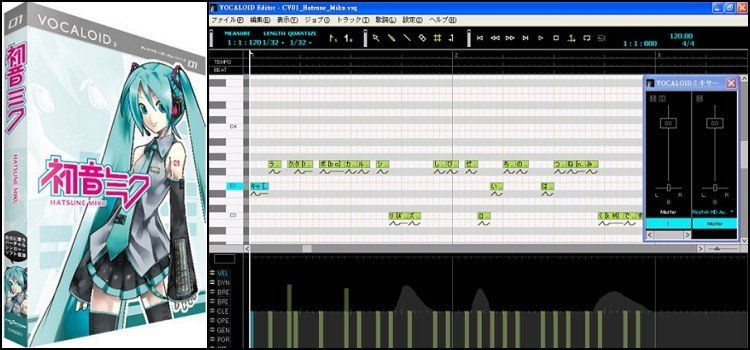
For most of the 2010s, the most recognizable Japanese speech-synthesis products were VOICEROID and A.I.VOICE, both produced by AH-Software in partnership with voice actor studios. VOICEROID launched commercially in 2007 and is sold as a desktop application with named characters such as 結月ゆかり (Yuzuki Yukari) and 東北ずん子 (Tohoku Zunko). The voices are high quality, but the engines are proprietary, the price per voice is meaningful, and modifying the underlying behavior is not something the licenses allow.
That commercial model worked well for hobbyists with a few hundred yen to spare, but it created a clear ceiling for anyone who wanted to build on top of a Japanese TTS engine: researchers, doujin developers, indie game studios and accessibility projects. A.I.VOICE, which arrived later, added a more flexible editor and a more permissive license, but it is still a paid product tied to a specific company.
The shift to neural TTS
Starting around 2017 to 2019, the field of speech synthesis moved quickly from concatenative and statistical parametric systems to neural TTS approaches based on deep learning. Models such as Tacotron 2, WaveNet and, more recently, VITS, Style-Bert-VITS2 and GPT-SoVITS produced voices that sounded far more natural, with realistic prosody and the kind of breath and rhythm that earlier engines simply could not generate. Japanese open-source projects caught up quickly, partly thanks to community efforts on Hugging Face and PyTorch, and partly thanks to voice actors who began releasing samples under permissive terms.
VoiceVox in development
Hiroshiba Kazuyuki began developing VoiceVox around 2020, with the first public release on GitHub following in 2021. The project combined a pre-existing open TTS engine with a clean, user-friendly front end and a small but distinctive set of characters. It spread through Japanese Twitter, then through Discord servers and GitHub issues. Within a year it had tens of thousands of users; within two, it had become a default tool for VTubers, fan-translation dubbers and indie creators.
The project is closely related to, but distinct from, COEIROINK, another open-source Japanese TTS application that followed a similar philosophy. It also integrates with commercial products in the same family, including A.I.VOICE, allowing creators to combine character voices from multiple engines inside one project.
The technology behind VoiceVox
VoiceVox is, in engineering terms, a fairly conventional modern neural TTS pipeline wrapped in a much friendlier interface than most open-source speech projects. Understanding the moving parts is useful if you plan to integrate it into a project or just want to know why it sometimes struggles with edge cases.
Text analysis and front-end processing
Japanese is hard to pronounce by machine. The same kanji sequence can be read in multiple ways, depending on context, and the language mixes kanji, hiragana, katakana, half-width characters and a steady stream of loanwords. Before any audio is generated, the engine runs a text front-end that performs word segmentation (usually with tools such as MeCab), converts the result into reading furigana, and applies accent and intonation rules. VoiceVox exposes a fair amount of this to the user: you can override the reading of a word, mark a phrase as a question, and add explicit pauses.
The acoustic model
The acoustic model turns the processed text into a mel-spectrogram, a compact time-frequency representation of what the audio should sound like. VoiceVox is widely understood to build on a VITS-family architecture (with elements shared with later projects like Style-Bert-VITS2 and GPT-SoVITS), which combines the acoustic model and the vocoder into a single network and generates waveforms in a single pass. That design choice is part of why VoiceVox sounds fluid on consumer hardware: there are fewer discrete stages where errors can compound.
The vocoder
The vocoder is the part that actually turns the mel-spectrogram into a waveform your speakers can play. VoiceVox supports GPU acceleration through CUDA on Nvidia cards and Metal on Apple Silicon, which makes real-time synthesis comfortable on most modern machines. A CPU mode is available for laptops and handhelds without a dedicated GPU, at the cost of noticeably higher latency.
API, integrations and custom voices
The engine speaks a simple HTTP API, which is what most third-party tools target. A typical integration looks something like this:
POST http://localhost:50021/audio_query with the text in the body, followed by POST http://localhost:50021/synthesis?speaker=1 with the resulting query, returning a WAV file. This shape makes it trivial to wire VoiceVox into a Discord bot, an OBS plug-in, a Ren'Py visual novel, a Unity project or a Python script that converts a chapter of Japanese text into an audiobook.
Beyond the official releases, an active community trains custom voice models using recorded samples, often following the same pipelines as Style-Bert-VITS2 or GPT-SoVITS. If you have a clean voice recording and a few hours of patience, you can produce a personal voice style that follows the same API. Most of these community models are not endorsed by the VoiceVox project itself, and they are governed by their own licenses, which brings us to the legal side.
Use cases and applications
VoiceVox is, in practice, a general-purpose speech engine with a few categories of users that have come to define the ecosystem.
YouTube and VTuber content
The most visible use of VoiceVox is in Japanese-language YouTube and live streaming. Channels that cover news, anime, gaming or general curiosity use synthetic voices to produce narration, and VTubers sometimes adopt a VoiceVox character as their speaking voice. The appeal is practical: a creator can produce a 15-minute script in roughly the time it takes to record it, the voice is consistent across episodes, and there are no scheduling conflicts with a voice actor. The trade-off is that the voice does not always hit the emotional beats a human performer would, which is why many channels combine VoiceVox narration with on-screen reactions or commentary.
Doujin games and indie development
VoiceVox has been a quiet gift to doujin (self-published) game development. A small team can now ship a short visual novel with full voice acting for a fraction of what a professional studio would charge, as long as they accept the characteristic feel of synthetic speech. The same is true for fan-made dubs of anime clips, training simulations and educational apps, where the budget simply does not allow for a paid recording session.
Education and language learning
For Japanese learners, VoiceVox is a particularly useful tool because it lets you hear the same sentence in multiple voices. You can pick a calm, slow voice for shadowing practice, a higher-energy voice to drill intonation, or compare a male and a female speaker side by side. The reading is generally accurate enough to trust as a pronunciation reference, although edge cases (rare readings, names, very recent loanwords) can still trip the engine up.
Accessibility and reading tools
Because the engine runs locally, VoiceVox is also a reasonable choice for accessibility projects that need to read long Japanese documents aloud without sending user data to a cloud service. Several open-source reading apps and note-taking tools integrate with the engine for exactly this reason.
Podcasts, audiobooks and prototypes
VoiceVox is increasingly used as a drafting tool for podcasts and audiobooks. Creators can prototype an episode by running the script through the engine, listen for pacing problems, and only commit a human voice actor to the final recording once the script is solid. The same workflow works for e-learning content, internal training material and corporate narration in small studios.
Available voices and licenses
One of the things that surprises newcomers is how much the choice of voice changes the character of an entire project. VoiceVox ships with a roster of named characters, each of which contributes a set of voice styles rather than a single sound.
Character roster
The list below is a snapshot of the characters most commonly recognized in the official release. Voice counts and style names change as new versions ship, so the exact numbers in the latest build may differ.
四国めたん (Shikoku Metan) is one of the default voices, a calm young woman with around a dozen styles ranging from normal and sweet to tsuntsun and sad. ずんだもん (Zundamon) is the breakout character of the project, a high-energy young mascot voice with roughly a dozen styles; it is the voice most listeners will recognize from YouTube. 春日部つむぎ (Kasukabe Tsumugi) is a softer, friendlier voice often used for narration and learning content. 雨晴はう (Amehare Hau) brings a gentle, slightly breathy tone. 波音リツ (Namine Ritsu) is a neutral, calm speaker commonly used for general-purpose narration.
Beyond those headliners, the project also ships with 玄野武宏 (Kurono Takehiro), a male voice; 白上虎太郎 (Shirakami Kotarou), a young male character; 青山龍星 (Aoyama Ryusei), a deeper male option; and several others that rotate in and out as the project grows. Lucy is the project's first widely available English voice, useful for projects that need short English passages mixed into Japanese narration, although its English coverage is much shallower than the Japanese side.
Engine license
The VoiceVox engine itself is released under the MIT License. You can ship it in commercial products, modify it, and redistribute it, provided the copyright notice travels with the code. This is the permissive baseline that has made the project attractive to small studios and research groups.
Voice model licenses
The voice models are a separate matter. Each character is contributed by a specific voice actor or studio, and the terms vary. Some voices can be used freely in commercial and non-commercial work, including paid YouTube videos and monetized games. Others are restricted to non-commercial use, or to specific channels, or to formats that include attribution. The official documentation lists the terms per character, and you should check it for any voice you plan to ship in a commercial product.
AudioMerge and credit tooling
The community maintains small utilities, often referred to under the umbrella name AudioMerge, that combine VoiceVox audio with other sources (background music, sound effects, multiple characters) and produce a final mix with the required credit lines baked into the file. These tools are not part of the core project, but they are the practical workaround for the most common licensing edge cases.
VoiceVox and the future of Japanese TTS
VoiceVox is one piece of a much larger shift in how Japanese speech synthesis is built, distributed and used. A few trends are worth watching.
Comparison with commercial TTS
Compared with commercial engines such as VOICEROID, A.I.VOICE and VOICEPEAK, VoiceVox is free, transparent and modifiable, but it does not always match the polish of a fully studio-recorded voice. The gap is narrowing with every release, and for most non-narration uses the difference is now small enough to be a matter of taste rather than a deal-breaker. For projects that need a single signature voice with a strong emotional range, a paid commercial engine is still often the safer bet.
The open-source advantage
The bigger advantage of the open-source model is the speed at which the community can experiment. VoiceVox is essentially a platform: anyone can build a wrapper, a plug-in, a custom voice, a Discord bot or a Ren'Py integration on top of it, and the best of those contributions tend to feed back into the wider ecosystem. That loop is hard to replicate inside a closed commercial product.
Limitations and language coverage
The main practical limitation is language coverage. VoiceVox is built for Japanese, and although the engine can be coaxed into producing short English phrases (and there is a dedicated English speaker, Lucy, in the official release), the project is not a general-purpose multilingual TTS system. If you need high-quality English, Chinese or Korean synthesis, you will get better results from a model trained specifically for that language, or from a multilingual engine such as the open-source projects in the GPT-SoVITS and Style-Bert-VITS2 family.
Ethics: voice cloning and consent
The same tools that make VoiceVox exciting also raise legitimate ethical questions. Voice cloning technology can be used to make a public figure say something they never said, to harass an individual with a synthetic copy of their voice, or to undermine trust in audio evidence. The VoiceVox project's license and the per-voice terms are the first line of defense: by being explicit about what each model can and cannot be used for, the project reduces the surface area for accidental misuse. Creators, for their part, are expected to disclose synthetic voices in contexts where the listener might otherwise be misled, and to respect the boundaries set by the voice actor who contributed a sample.
Real-time synthesis and live use
Real-time speech synthesis is another area where Japanese open-source projects are catching up to commercial systems. The latest VoiceVox engine can produce speech with latency low enough to be used in interactive contexts, including live chat, live-streamed narration and voice-driven games. That opens up use cases that older Japanese TTS engines simply could not support, from virtual assistants to real-time translation companions.
Community and contribution
The project lives or dies by its community. VoiceVox is actively developed on GitHub, discussed in Japanese on Discord, and surfaced on Twitter by both creators and voice actors. If you want to support the project, the most useful contributions are usually bug reports with clean reproduction steps, translations of the documentation, character art or voice samples released under a permissive license, and clear, kind feedback in the official channels. The voice actors who donate their time and recordings are, in many ways, the most important contributors, and treating their work with care is the simplest way to keep the project healthy.
VoiceVox is not a magic replacement for a human voice actor, and it is not trying to be one. It is a flexible, transparent, well-loved piece of open infrastructure for Japanese speech, and it has earned its place in the toolbox of anyone who works with Japanese text on a regular basis.





Community
Comments
0 comments
There are no published comments in this language yet.
Send comment